Automatic deal images
Sharp builds a 1200 × 628 image with the product photo, sale price, regular price, discount badge and store logo.

Case study · Shopify app
This Shopify social image automation case study explains how I built an app that creates a branded 1200 × 628 Open Graph image every time a merchant creates or updates a product. When someone shares a product link on WhatsApp or Facebook, the preview shows the deal: the price, the old price, a discount badge and the store's logo, instead of a plain product photo.
I first built it for a Shopify deals store whose products are shared as WhatsApp links. The hard part wasn't drawing the image. It was making WhatsApp and Facebook show the new image after a price change, without calling any scraper API.
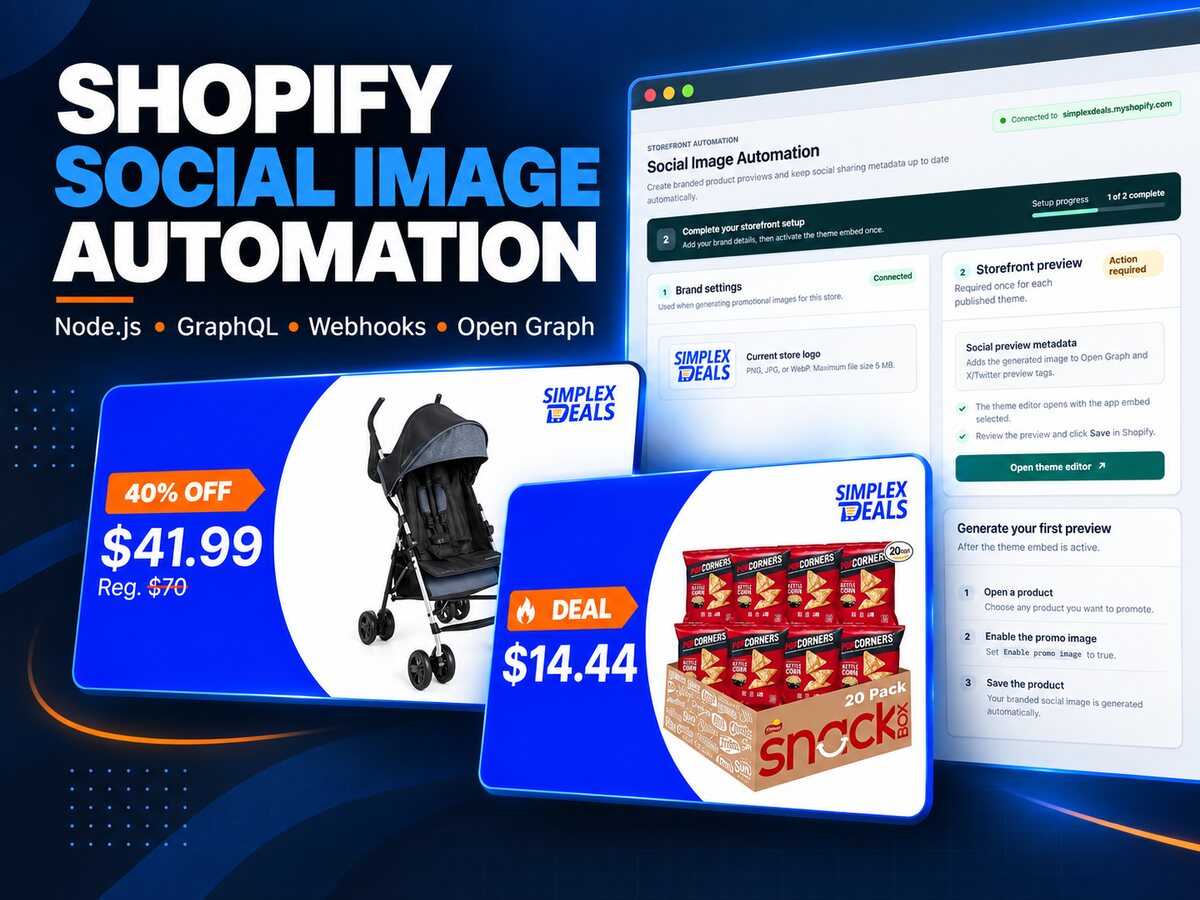
A deals store lives on shared links. When a product link lands in a WhatsApp group, the preview card is the first thing people see. By default, Shopify shows the product photo and title. That hides the one thing a deal shopper cares about: the price and how much they save.
Making a custom image for every product by hand takes time, and it goes out of date the moment a price changes. Even worse, WhatsApp and Facebook cache link previews. Upload a new image, share the link again, and people often still see the old one.
What I built
Shopify tells the app when a product changes. The app draws the image, stores it in the merchant's store and tells the storefront which version to share.
Sharp builds a 1200 × 628 image with the product photo, sale price, regular price, discount badge and store logo.
For deal pages, a four-card roundup image shows several selected products in one preview.
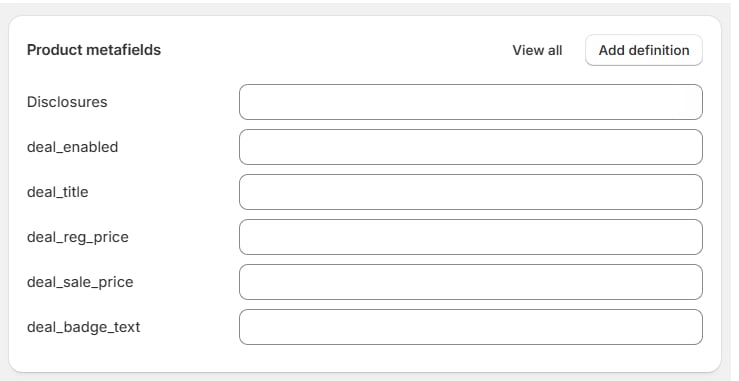
Product metafields let the merchant change the badge text, sale price, regular price or headline, or turn the image off for one product.
Each image is uploaded to the store's own Shopify Files and served from the Shopify CDN, then written back to the product.
A theme app embed adds a short sharing version to the product URL, so WhatsApp and Facebook treat a changed deal as a new link.
App Bridge ID-token auth, encrypted offline tokens per shop, HMAC-verified webhooks and Shopify's mandatory privacy webhooks.
When a merchant saves a product, Shopify sends a signed products/update webhook. The app checks the signature first. It computes an HMAC of the raw request body with the app secret and compares it with Shopify's header using a constant-time comparison. Anything that doesn't match is rejected before it touches a store.
Then the app finds the store's encrypted token, reads the product and its deal overrides, and builds the image with Sharp. It uploads the file to Shopify Files and writes the image URL, the image version and the sharing version back to the product in one GraphQL mutation.
Shopify sends a product webhook for many small edits, like stock changes, and it can send the same event more than once. So the app hashes everything that affects the image: title, prices, overrides, photo and logo. If the hash matches the last one stored on the product, it skips the job. If the hash matches but the stored image is missing, it rebuilds it instead of trusting the hash.

Social apps cache previews by URL. If the URL never changes, the old preview can stay for a long time. My fix was to make the URL change only when the deal changes. The app stores a short sharing version on the product. A theme app embed prints it in the page head, and a tiny script adds it to the address bar as ?pv=. When a shopper copies the link, they copy the current version.
This is the real script from the theme app embed:
(() => {
  const version = document.querySelector('meta[name="social-image-version"]')?.content;
  if (!version) return;
  const url = new URL(window.location.href);
  if (url.searchParams.get('pv') === version) return;
  url.searchParams.set('pv', version);
  window.history.replaceState(window.history.state, '', `${url.pathname}${url.search}${url.hash}`);
})();
It uses replaceState, so the page doesn't reload and the back button still works. Because it ships as a theme app embed, the merchant turns it on in the theme editor. Nobody edits theme code.
During install, the app creates the product metafield definitions it needs. The merchant fills them in on the normal product page: a custom badge, a different sale or regular price, a headline, or hide to remove a badge or the prices. Leave them empty and the app uses the product's own price and compare-at price.
The merchant saves a product and the shareable deal image is ready, with no design work and no manual upload. A price change produces a new image and a new sharing version, so the next shared link shows the new deal.
Tell me what your team still does by hand in Shopify. I'll tell you whether an app, a webhook or a simple script is the right fix. See my AI SaaS development services for how I work.